 How-to
7 Ways to Track Assistant Coach Moves in College Sports
Last Updated: November 21, 2026
Quick Summary
Track assistant coach movement by checking official athletics staff directories, school press releases, and verified coach social accounts, then confirming each change against a primary source before logging it. Sort reported moves into a separate watchlist until a school confirms them.
- Official athletics staff directories and school press releases are the most reliable confirmation sources.
- Classify each report as unconfirmed, reported, or confirmed, and log only confirmed moves in your main tracker.
- Save the primary source link and access date at the moment you verify a move.
- Use one standard schema with coach, sport, division, prior role, new role, move type, and dates for every entry.
- Check staff directories against the most recent dated announcement, since directory pages are often stale.
Table of Contents
- Why Assistant Coach Moves Matter for Recruiting
- Where College Coaching Changes Are Announced First
- How to Verify and Log a Coaching Change
- Search Strategies for Finding Assistant Coach Changes
- Building a College Coaching Staff Directory by Sport
- Setting Up Alerts and Keeping Your Tracker Current
- Using Coaching Moves to Plan Your Outreach
- Frequently Asked Questions
Why Assistant Coach Moves Matter for Recruiting
Assistant coaches often decide who gets recruited. Head coaches set the vision, but assistants usually run position groups, evaluate film, and build the relationships that lead to offers, which is why every assistant coach movement is worth watching closely. When an assistant leaves, the athletes they were recruiting can lose their main contact overnight.
That is why tracking these moves matters. A new assistant may bring a different recruiting focus, a different roster plan, or a different idea of what a player at your position looks like. Knowing about a change early gives you time to adjust your outreach instead of writing to someone who is no longer on staff.
Here is a practical way to track those moves without guessing.
Where College Coaching Changes Are Announced First
Coaching changes usually surface in a predictable order. Social media posts from the coach or a school often come first. Local beat reporters and sport-specific news sites follow. The official athletics website usually confirms the change last, though it is the most reliable source.
Expect some lag. A change can circulate as a rumor for days before anyone confirms it. Treat early reports as leads, not facts. For guidance on interpreting coach feedback, see how to interpret college coach feedback.
Useful places to watch include:
- Official athletics staff directories
- School press releases and news pages
- Verified coach social media accounts
- Reputable sport-specific news outlets
How to Verify and Log a Coaching Change
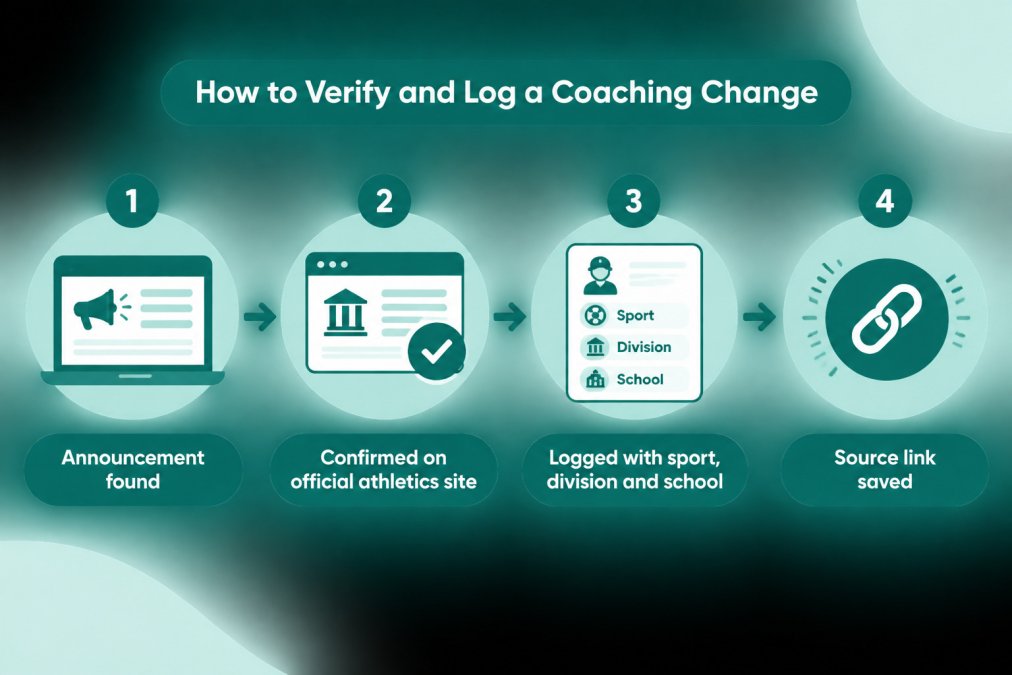
Most coaching-change coverage stops at the headline. A tracker only works if every entry follows the same verification steps and the same field definitions, so two records from different months can be compared without guesswork. Treat this as a workflow, not a one-time task.
Step 1: Classify What You Found
Before you verify anything, label the report by how solid it is. A simple three-tier system keeps rumor out of your records:
- Unconfirmed: a social post, message-board thread, or single reporter citing anonymous sources. Log it in a separate watchlist, never in the main tracker.
- Reported: a named reporter or outlet states the move, but the school has not confirmed it. Still a lead.
- Confirmed: the school's athletics site, a press release, or the coach's own verified account states the move. This is the only tier that belongs in your tracker.
A common pattern is for a move to sit at "reported" for several days before the school posts anything. That lag is normal, and it is exactly why the tiers matter.
Step 2: Confirm With a Primary Source
A primary source is the school itself or the coach's own verified channel. Check the official staff directory for the team in question first. If the coach has moved on, the directory usually reflects it within days, though smaller sports and part-time roles can take longer.
Watch out: staff directories are frequently stale. An old page can list someone who left months ago, or omit a hire that was announced last week. Compare the page against the most recent dated announcement before you trust it, and note the date you checked.
Step 3: Log the Move in a Standard Format
Use the same fields for every entry so your tracker stays searchable and sortable, and log each assistant coach movement the same way. A workable schema looks like this:
| Field | What to record | Example format |
|---|---|---|
| Coach | Full name as listed by the school | First and last name |
| Sport | Sport and gender program | Baseball (men's) |
| Division | NCAA Division I, II, III, NAIA, or NJCAA | NCAA Division II |
| School and conference | Current or new school, plus conference | School name, conference |
| Prior role | Title and school before the move | Assistant coach, previous school |
| New role | Title and school after the move | Pitching coach, new school |
| Move type | Hired, departed, promoted, interim, or reassigned | One of these five |
| Announcement date | Date the move was first reported | Month, day, year |
| Effective date | Date the coach starts or left, if stated | Month, day, year |
| Confirmation status | Confirmed or reported | Confirmed |
| Source | Link to the primary source, saved at verification | Full URL |
The move-type field is the one most people skip, and it is the one that changes your read on a program. A promotion signals continuity. An interim tag signals uncertainty. A departure with no replacement named yet signals a staff in transition.
Step 4: Save the Source at the Moment You Verify
Save the link when you confirm the move, not later. Pages get edited, archived, or removed, and a saved source makes your record checkable months down the line. If you use a spreadsheet, paste the URL into the source column and add the date you accessed it. If the page later changes, your note explains why your entry looks different from the live site.
Always confirm a specific move against the school's own pages before you log it as confirmed.
Search Strategies for Finding Assistant Coach Changes
Good search terms save hours, but the bigger problem is coverage. Most coaching-change coverage clusters around football, men's basketball, and baseball at the largest programs. Assistant moves in women's sports, Olympic sports, Division II, Division III, NAIA, and junior college are reported less often and confirmed later. A search strategy that only follows the biggest programs will miss most of the assistant movement you actually care about.
Build a Source Hierarchy
Work from the most reliable source down, and only move to the next tier when the one above is silent:
- School athletics site: staff directory, news page, and press releases. This is the confirmation source.
- Conference sites: useful for roundups of hires across member schools.
- Reputable sport-specific outlets and beat reporters: usually first to report, but treat as leads until the school confirms.
- Coach social accounts: a coach announcing a new job is strong signal, but verify against the school before logging.
- Job listings: posted openings reveal a vacancy before a hire is announced, which gives you a head start on programs in transition.
Search Patterns That Actually Work
Combine the school, sport, and a role phrase, and add the current year to narrow results:
- "[school name] [sport] assistant coach hired"
- "[school name] [sport] staff"
- "[sport] coaching staff changes [conference]"
- "[school name] athletics staff directory"
- "[sport] assistant coach opening [division]"
Run the same patterns for the less-covered sports on your list. A search for a Division III women's soccer assistant will return far fewer results than the same search for a Division I football assistant, so plan to check those programs more often and rely more heavily on the school's own directory.
Set Alerts and Automate the Repeat Work
Saved searches and news alerts do the monitoring for you between checks. Set alerts for the schools and sports on your list, and review them on a fixed day each week. Turn off alerts for programs you no longer target so the inbox stays useful.
A few habits keep the tracker from filling with duplicates and stale entries:
- Deduplicate by coach and school: the same move often appears in three or four places. Log it once, under the primary source.
- Recheck reported entries weekly: a lead that stays unconfirmed for several weeks is usually dead, but confirm before you delete it.
- Mark entries that need reconfirmation: a hire announced in spring may be followed by another move before the season starts.
- Archive programs you have stopped pursuing: keep the record but move it out of your active list.
Watch out: an alert that fires on a rumor can send you chasing a move that never happens. Keep reported items in a separate watchlist until a primary source confirms them, and never let an unconfirmed item overwrite a confirmed entry.
Building a College Coaching Staff Directory by Sport
A staff directory gives you one place to see who coaches each position at each school. Organize it by sport first, then by school. Within each school, list the head coach and each assistant with their role.
Update the directory on a set schedule. Weekly checks work well during the season and hiring periods. Note the date of each check so you know how current your information is.
A directory also helps you spot patterns. If several assistants at one school have left in a single season, that program may be in transition, and your outreach plan should reflect it.
Setting Up Alerts and Keeping Your Tracker Current
Alerts save time once your tracker is set up. Create alerts for the schools and sports on your list, and review them on a fixed day each week. Turn off alerts for programs you no longer target so the inbox stays useful.
Keep the tracker current by:
- Reviewing each entry every few weeks
- Marking entries that need reconfirmation
- Archiving programs you have stopped pursuing
Using Coaching Moves to Plan Your Outreach
Once you know who is on staff, adjust your outreach. If a position coach at your target school just changed, consider introducing yourself to the new coach with a short, specific message. Mention your position, your academic interests, and a link to your highlight film.
Follow up on a regular schedule rather than all at once. Keep your message brief and respectful of the coach's time. For more on this, see our guide on how to follow up with college coaches.
RecruitMyGame can help you focus on programs with a real need for your position.
Frequently Asked Questions
How can you find out when a college assistant coach changes jobs?
Start with the school's official athletics staff directory, which usually lists current assistants by sport. Check the athletics news page and the program's official social accounts for announcements. Compare the staff list against a dated copy you saved earlier to spot changes. Confirmed moves are typically posted by the school itself, so treat reports from unnamed sources as leads to verify rather than facts to log.
Where can you track college coaching changes across different sports?
No single source covers every sport, division, and conference reliably. Most families combine official school staff pages, conference websites, and reputable sports news outlets that report hires and departures. A personal tracker spreadsheet that records the sport, division, school, role, and source for each move lets you monitor many programs in one place and see patterns over time.
How do assistant coach changes affect college recruiting?
A new assistant often brings in recruiting responsibility for a specific position or region, so an athlete's contact may no longer be the right person. Staff turnover can also change a program's roster needs, since a new coach may recruit different positions than the previous one. Checking who currently recruits your position before you write helps you avoid contacting someone who has moved on.
Should you contact a college coach after an assistant coach leaves?
Yes, but direct your message to the coach who now handles recruiting for your position. Confirm the change on the official staff directory first. Keep the message short, mention your position and graduation year, and link your highlights and academic information. If the program has not named a replacement yet, the head coach's office can usually point you to the right contact.