 How-to
How to Make a Sports Recruiting Website: A Step-by-Step Guide
Last Updated: November 22, 2026
Quick Summary
To make a sports recruiting website, choose a simple domain using the athlete's name and a mobile-friendly template, then add core pages for the profile, stats and academics, video, and contact details. Coaches need position, graduation year, measurables, and a highlight video quickly, so the site should be easy to skim on a phone.
- Use the athlete's name in the domain, such as firstnamelastname.com.
- Include position, height, weight, class year, school, current stats, and contact info on the first page.
- Keep highlight videos to one to three minutes with the best plays first.
- Embed video from a video platform rather than uploading large files.
- Update stats after each season, since outdated information quickly loses a coach's interest.
Table of Contents
- What a Sports Recruiting Website Needs Before You Build It
- Step-by-Step: Building a Sports Recruiting Website Template
- Adding Your Athlete Highlight Video and Next Steps for Coaches
- Frequently Asked Questions
What a Sports Recruiting Website Needs Before You Build It
Building a sports recruiting website starts with what a college coach needs in the first minute. Many families fill pages with photos but skip position, graduation year, measurables, and contact info. Clear, complete details help coaches assess a prospect quickly, and the same focus on useful information can shape Avatar Website Design for any organization.
Before picking a domain or template, decide what the site must answer: name, sport, position, height, weight, class year, school, current stats, and a short academic summary with GPA and test scores if strong. Coaches also need a clear way to reach the athlete or a parent.
A one-page layout works well: athlete bio and contact info, sport-specific stats and academics, highlight video with a link to full game film, and schedule with recent results.
Keep the structure simple. Coaches skim, so every section should be easy to find on a phone.
For what coaches evaluate, read our Wrestling Recruiting 2026 guide, which explains how verified results and full-match film shape a coach's view.
Step-by-Step: Building a Sports Recruiting Website Template
Most families can build a basic recruiting site in an afternoon using a website builder or free template.
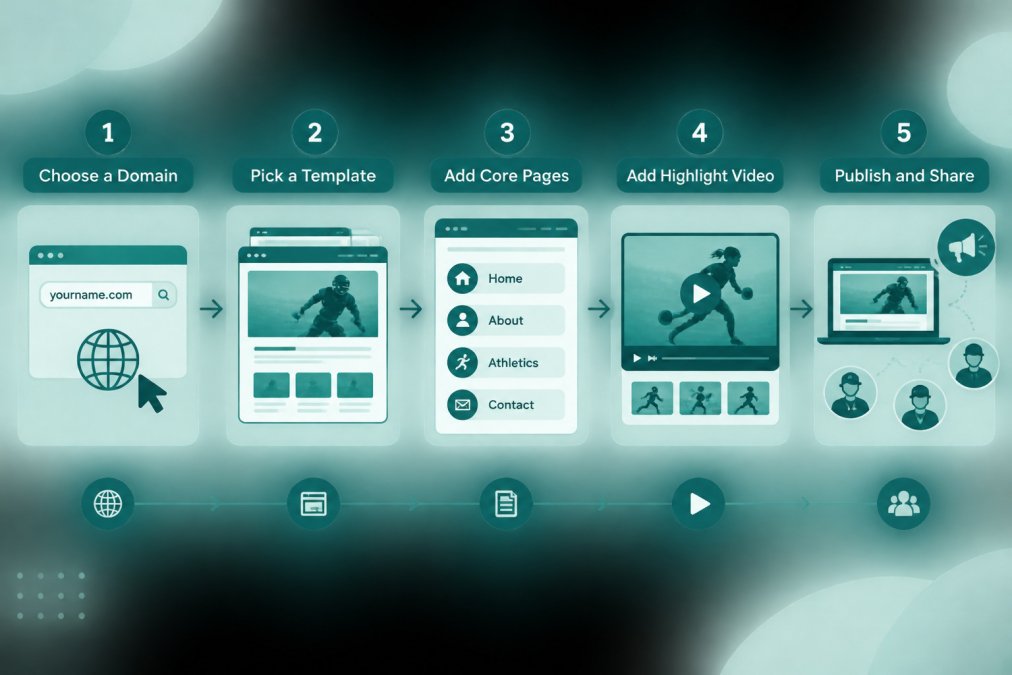
- Choose a simple domain. Use the athlete's name, like firstnamelastname.com.
- Pick a mobile-friendly template that loads quickly and stays readable on small screens.
- Add core pages: Home, Athlete Profile, Stats and Academics, Video, and Contact.
- Embed the highlight video from a video platform rather than uploading large files.
- Publish and share the link with coaches via a short email naming the team and graduation year.
Update stats after each season; outdated information quickly loses a coach's interest.
The core steps for building a basic recruiting site are summarised below.
| Step | What to do | Timing |
|---|---|---|
| Choose a domain | Use the athlete's name, like firstnamelastname.com | Before building |
| Pick a template | Choose a mobile-friendly template that loads quickly | Before building |
| Add core pages | Home, Athlete Profile, Stats and Academics, Video, Contact | During building |
| Embed video | Use a video platform rather than uploading large files | During building |
| Publish and share | Email coaches the link, naming the team and graduation year | At launch |
| Update stats | Refresh information after each season | Every season |
Adding Your Athlete Highlight Video and Next Steps for Coaches
Keep highlight videos to one to three minutes with the best plays first. Film from a steady position in landscape mode at 1080p or higher; our guide on filming sports highlights with a smartphone covers settings and positioning.
Pair video with proof beyond the highlight reel. Coaches trust other coaches, and verified reviews show coachability, character, and work ethic. Read The Power of Coach Reviews, then add that context to your profile.
Once live, send the site to coaches and follow up on a set schedule, such as every few weeks during the recruiting window. Track which programs respond and adjust outreach.
Frequently Asked Questions
Is there a free way to make a sports recruiting website?
Yes. Free website builders let you publish a basic athlete page at no cost, though custom domains and advanced features usually require a paid plan. Recruit My Game also offers a permanent Free plan that includes a complete athlete profile, which can serve as a starting point if you want coaches to find you without building a separate site. Compare what each option includes before choosing, and confirm current pricing directly on the provider's website.
What should a sports recruiting website include?
At minimum, include an athlete bio, sport and position, height and weight, academic information such as GPA and test scores, game statistics, a highlight video, a team schedule, and current contact information for the athlete or a parent. Keep the most important information on the first screen, since coaches often review many profiles quickly. Update stats and schedules each season so the page stays accurate.
How often should a student-athlete update a recruiting website?
Update the site at least after each season and whenever you achieve a notable result, such as a new personal best, an award, or an updated academic record. Replace old highlight footage with current clips as your skills improve. Remove outdated schedules and contact details promptly, because stale information makes a profile look neglected.