 blog
Is RawRecruit or AthleticScholar Better for Athletes?
Last Updated: November 8, 2026
Quick Summary
Whether rawrecruit vs athleticscholar favors your athlete depends on whether the tool helps you find programs with a real opening at your position. Both offer athlete profiles and direct coach messaging, but the differences that change outcomes are roster-need matching and verified coach information.
- Ask whether the tool shows roster needs for your athlete's specific position before you commit.
- Check how long a coach has been at a program, since staff stability affects recruiting timelines.
- Confirm that coach reviews are verified rather than relying on unverified feedback.
- Make sure the platform covers your athlete's sport and division level with real coach and roster data.
- Use a free trial to test whether the coach data works for your sport before paying.
Table of Contents
- How RawRecruit and AthleticScholar Fit Into College Recruiting
- Side-by-Side: Features, Profiles and Coach Outreach
- Where RecruitMyGame Fits When You Want Roster-Level Targeting
- Picking the Right Platform and Next Steps for Your Athlete
- Frequently Asked Questions
How RawRecruit and AthleticScholar Fit Into College Recruiting
Choosing a recruiting platform feels like a big decision, and it should. Plenty of families weigh competing platforms before they commit, and many parents wonder whether the differences even matter for their kid. At RecruitMyGame, we think the better question is which tool helps your athlete reach programs that actually need a player at their position right now.
Most recruiting tools focus on athlete profiles and coach outreach, but the real differences show up in how a tool finds programs and handles coach information.
Before you commit to any platform, ask whether the tool shows roster needs for your position, how long a coach has been at a program, and whether a coach review is real, because those answers matter more than a long feature list.
Side-by-Side: Features, Profiles and Coach Outreach
A comparison table only helps if it tells you something new, so here is a practical breakdown of what each tool actually does well.
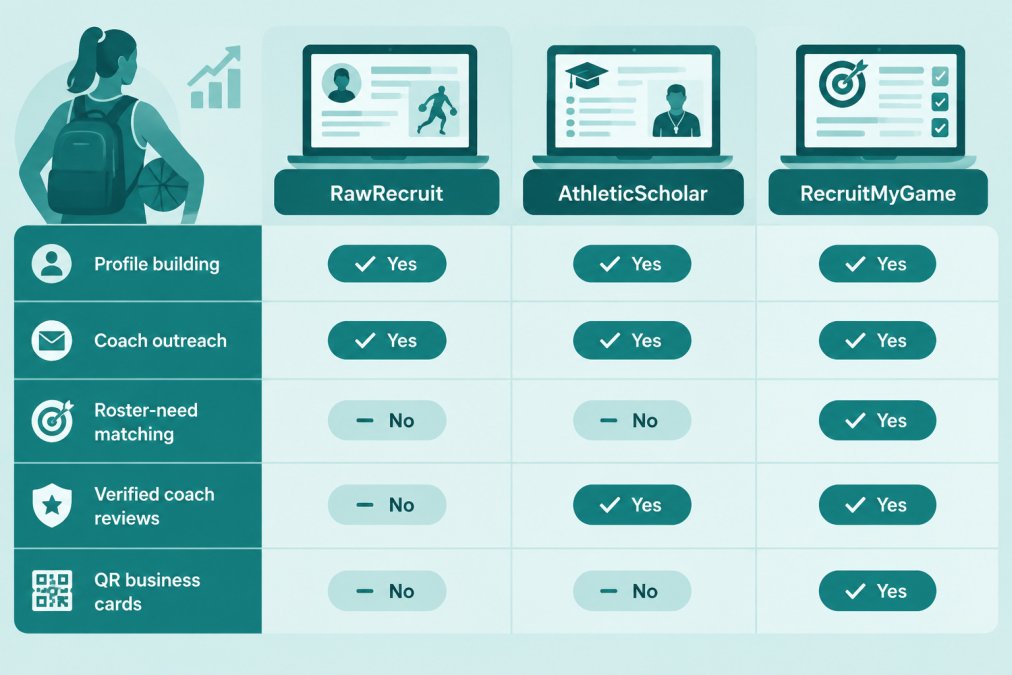
| Capability | RawRecruit | AthleticScholar | RecruitMyGame |
|---|---|---|---|
| Athlete profile with film and stats | Yes | Yes | Yes |
| Direct coach messaging | Yes | Yes | Yes |
| Roster-need matching by position | Limited | Limited | Yes |
| Verified coach reviews | Not standard | Not standard | Yes |
| QR business cards and personal URL | Not standard | Not standard | Yes |
| Sport coverage | Broad multi-sport | Broad multi-sport | 20+ sports |
| Free trial or free tier | Check current plans | Check current plans | Yes |
Profile building and coach outreach are table stakes now. The differences that actually change outcomes show up in how a tool identifies programs with a real opening at your athlete's position and whether coach information is verified.
RecruitMyGame is built around roster-level targeting, verified coach reviews, and QR business cards that make in-person sharing easy for athletes who need to cut their list rather than grow it.
Watch out: a long feature list can create the illusion of progress, but if the platform cannot tell you whether a program has a need at your position, you are still sending messages into a void. Targeting beats volume every time.
One more thing worth checking before you commit is sport and division coverage, so ask directly which sports and divisions the tool supports at your athlete's level.
Where RecruitMyGame Fits When You Want Roster-Level Targeting
Many athletes send the same message to dozens of programs and hear nothing back because the team already has a full roster at that position. RecruitMyGame looks at roster data, graduation timelines and coaching staff stability to flag programs with a real need, giving your athlete a shorter, better list.
Verified coach reviews help too, since you can see what other families and athletes report about a coach before you reach out. If you want the full list of features, including AI college matches scoped to your sport, position, and location, check out the recruiting profile page. For a deeper check on staff stability, read our guide on How to Verify College Coach Roster Stability.
The QR business cards and personal web address give your athlete a way to share film and stats at camps and showcases. Support covers more than 20 sports.
Picking the Right Platform and Next Steps for Your Athlete
Most recruiting-platform advice tells you to 'know what you need,' which is true but not very useful when you are staring at three tabs and a credit card form. A better approach is to match the platform to your athlete's specific situation, because the right choice for a sophomore with no film is very different from the right choice for a senior with two offers on the table.
If your athlete is early in the process without a highlight reel or verified stats, prioritize the platform with the strongest profile-building tools and the clearest guidance on what coaches actually want to see, since a polished profile is the foundation everything else rests on. If your athlete is mid-cycle and already sending messages but hearing nothing back, the problem is usually targeting rather than exposure, and a tool built around roster-need matching will save more time than another round of mass outreach. If your athlete is late in the process with offers in hand, the priority shifts to comparing programs by depth chart, coaching stability, and physical fit, which is a different job than getting discovered. Once offers are on the table, scholarship tracker tools can help keep deadlines, award details, and program comparisons organized alongside the questions that matter most for fit.
Budget matters too, and the free trial is useful for testing whether the platform's coach data works for your sport before you pay. Check RecruitMyGame's website directly for current plans and pricing, since plan options and feature limits can change.
Sport and division also shape the choice, so confirm that the tool has real coach and roster data for the division level your athlete is targeting.
If you already have offers, compare them by roster need, depth chart, physical fit, and coaching stability, because that comparison shows where your athlete will actually get playing time rather than where the logo looks best. Find the one where you'll actually play.
Ready to choose a plan? Compare RecruitMyGame pricing plans to see the free, Premium, Pro and Super Charged Pro tiers side by side. Before you reach out to coaches, make your profile coach-ready, since a quick refresh of stats, schedule, links, and verified reviews makes a strong first impression. RecruitMyGame helps athletes stop writing to full teams and focus on programs with real openings. Try the free trial to see whether roster-level targeting fits how your athlete recruits.
Frequently Asked Questions
How do I know if RecruitMyGame's AI is looking at real roster needs?
RecruitMyGame says it analyzes roster data, graduation timelines and coaching staff stability to flag programs that need a player at your position. The practical test is simple: before you pay for anything, check a few schools you already know against their own athletics sites. Use the free trial to see how the matches look for your position.
Can a platform like this help a 3-star athlete at a smaller high school?
Yes, it can help, but the value depends on how you use it. Build a profile with your film, stats and academics, then target programs where your position is actually needed. Pair that with direct emails to coaches, because a platform is a starting point, not a guarantee of interest.
What should I look for in a recruiting platform before I subscribe?
Start by asking what the platform actually does for you that you can't do for free. Look for roster-need data, a profile you control, a way to reach coaches, and clear information about how often the data is updated. Ask whether coach reviews are verified and how. Check the free trial terms and the plan limits before you commit. Also confirm how you can remove your profile later.